
iWorkout Lite1.3 - App Store
You'll be able to see results in few seconds.
Publisher Description
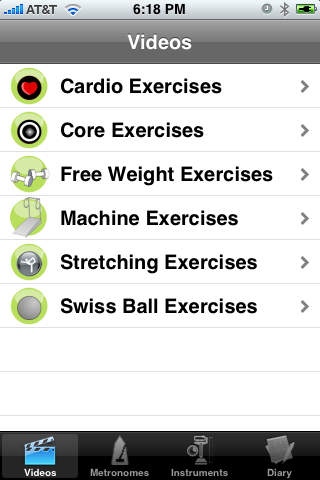
Do you want a personal trainer in your pocket? iWorkout Lite is a lite version of the ultimate fitness and exercise guide for iPhone & iPod touch. It is used by hundreds of thousands of fitness professionals and enthusiasts worldwide.
iWorkout Lite includes the following:
* Exercise videos - 5 per category in this lite version
* Exercise instruments
* Exercise metronomes to time your reps (5 in this lite version)
* Exercise diary to record your progress
* Trainer tips
iWorkout Lite's exercise videos are narrated by a certified fitness expert. All exercise videos are stored locally on your iPhone or iPod touch. Trainer tips are included in each video. iWorkout exercise videos cover the following fitness areas:
- Cardio
- Core exercises
- Free weights
- Machine exercises
- Stretches
- Swiss ball
- Abs, Circuit training, Full body, Lower body, & Upper body.
The exercise instruments feature currently contains a pedometer to accurately track your walk or run. More exercise instruments will be added in future updates.
The exercise metronomes feature allows you to properly time your repetitions while exercising.
The exercise diary feature allows you to store notes on your progress. You can write down your fitness-related goals, achievements, or whatever keeps you on track.
Workout the right way with iWorkout Lite.
Headphones are recommended for video and metronome audio output.
The next update will include a Weight Tracker and BMI Calculator. You will also be able to make customizable workouts to stay on track while exercising.
Requires iOS 3.0 or later. Compatible with iPhone, iPad, and iPod touch.
About iWorkout Lite
The company that develops iWorkout Lite is Helmes Innovations, LLC. The latest version released by its developer is 1.3.
To install iWorkout Lite on your iOS device, just click the green Continue To App button above to start the installation process. The app is listed on our website since 2008-11-30 and was downloaded 0 times. We have already checked if the download link is safe, however for your own protection we recommend that you scan the downloaded app with your antivirus. Your antivirus may detect the iWorkout Lite as malware if the download link is broken.
How to install iWorkout Lite on your iOS device:
- Click on the Continue To App button on our website. This will redirect you to the App Store.
- Once the iWorkout Lite is shown in the iTunes listing of your iOS device, you can start its download and installation. Tap on the GET button to the right of the app to start downloading it.
- If you are not logged-in the iOS appstore app, you'll be prompted for your your Apple ID and/or password.
- After iWorkout Lite is downloaded, you'll see an INSTALL button to the right. Tap on it to start the actual installation of the iOS app.
- Once installation is finished you can tap on the OPEN button to start it. Its icon will also be added to your device home screen.
Program Details
System requirements
Download information
Pricing
Version History
version 1.3
posted on 2008-11-30
Disclaimer
Official App Store Link
We do not host iWorkout Lite on our servers. We did not scan it for viruses, adware, spyware or other type of malware. This app is hosted by Apple and passed their terms and conditions to be listed there. We recommend caution when installing it.
The App Store link for iWorkout Lite is provided to you by apps112.com without any warranties, representations or guarantees of any kind, so access it at your own risk.
If you have questions regarding this particular app contact the publisher directly. For questions about the functionalities of apps112.com contact us.
